
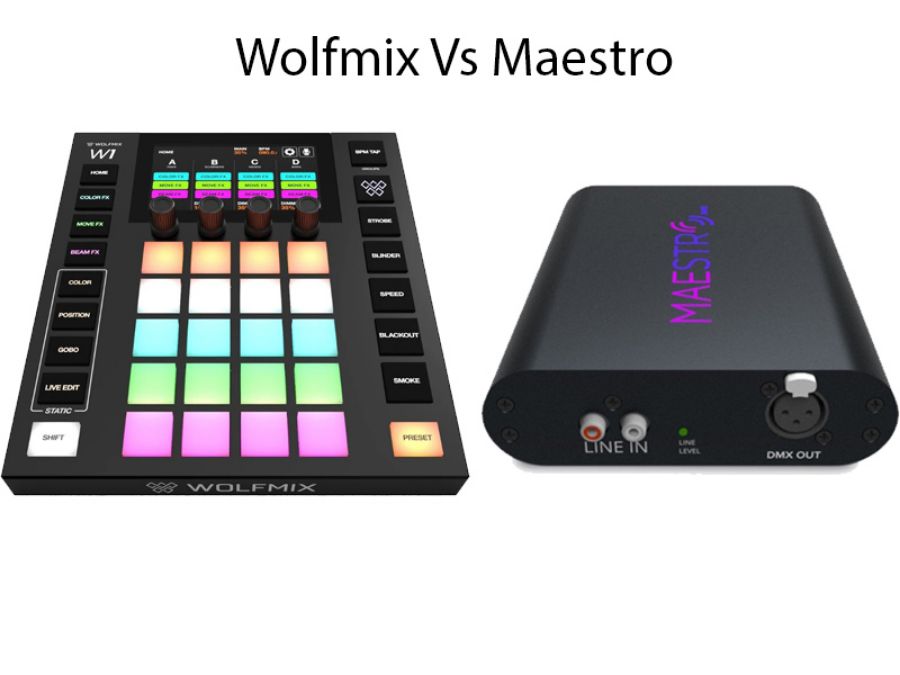
And why some lighting designers might want both in their toolkit!
If you've been researching DMX lighting controllers, you've probably noticed two names keep coming up: the Wolfmix W1 MK2 and MaestroDMX. Both are powerful, modern controllers that have revolutionised how DJs, venues, and lighting designers approach automated lighting but they take fundamentally different approaches to solving the same problem.
The good news? You don't necessarily have to choose. Some professionals are discovering that these two controllers complement each other perfectly, each excelling in scenarios where the other isn't ideal.
Following is our real-world take on what makes each controller special, where they shine, and why you might want both in your lighting arsenal.
The Fundamental Difference: Hardware vs. Software Philosophy
Before we get into features and specifications, it's important to understand the core design philosophy that separates these controllers.
Wolfmix W1 MK2: The Tactile Performer
The Wolfmix is a standalone hardware controller—a physical device with knobs, rotary faders, and buttons that you can touch, twist, and push. It's designed for live performance, where muscle memory and instant tactile feedback matter. Think of it as the digital mixing desk approach to lighting: everything is laid out in front of you, ready for hands-on manipulation.
Key Philosophy: Direct, tactile control without computer dependency. When you're performing live, you need physical controls you can operate without looking, reliable hardware that won't crash, and the confidence that comes from purpose-built professional equipment.
MaestroDMX: The Intelligent Assistant
MaestroDMX takes a completely different approach. It's a software-based AI system accessed through a web browser on any device. Rather than manually controlling every aspect of your lights, you teach MaestroDMX what fixtures you have and let its artificial intelligence analyse your music and create synchronized light shows automatically.
Key Philosophy: Automation and intelligence. Why spend hours programming when AI can listen to your music and create professional-looking synchronized effects in real-time? Access your lighting from any device, anywhere, without dedicated hardware.
Now that we understand their different approaches, you can compare them across key criteria.
Control Method: Hands-On vs. Hands-Off
Wolfmix W1 MK2: The Performer's Instrument
The Wolfmix treats lighting like a musical instrument. You have:
- Physical encoders with LED rings showing parameter values at a glance
- Dedicated rotary faders for intensity control
- Tactile buttons that provide physical feedback
- Instant access to effects modules without menu diving
- Muscle memory development - after a few shows, you'll operate it without looking
This tactile approach is crucial during live performances. When you're running lights for a band that suddenly extends a jam session, you need to be able to reach over and adjust parameters instinctively. The Wolfmix's physical interface makes this possible.
Best for: DJs who beatmix live, lighting operators who need to react to unpredictable live performances, anyone who values the tactile connection of physical controls.
MaestroDMX: Set It and Supervise
MaestroDMX's browser-based interface means you control everything from a tablet, phone, or laptop. But here's the key difference: you're not meant to be constantly adjusting things.
You configure your fixtures once (telling MaestroDMX what lights you have and where they point), select a general style or mood, and then let the AI do its work. The system listens to your music and autonomously controls color, movement, and effects in real-time.
You can intervene by adjusting colors, creating static scenes, or building cue timelines but the magic of MaestroDMX is that you often don't need to. It's doing the creative work for you.
Best for: DJs who want to focus on music rather than lights, venues needing automated ambiance that responds to energy levels, anyone who values "set it and forget it" operation.
Setup and Learning Curve
Wolfmix W1 MK2: Immediate Power, Growing Mastery
The Wolfmix is remarkably intuitive for a professional DMX controller, but there's still a learning curve:
Week One: You'll be creating basic color washes, triggering presets, and using the built-in effects modules. The new Intelligent Preset feature (firmware 2.0) auto-generates 80 presets based on your fixtures with one tap giving you a functional show instantly. That is a mind-blower when you see it happen.
Month One: You'll understand the FX modules (Color, Move, Beam), know how to fan and position moving heads, and start creating custom looks.
Month Three: You're building sophisticated multi-step sequences, combining effects creatively, and developing your own signature lighting style.
The advantage? Once learned, the Wolfmix becomes an extension of your creative vision. You're not limited by what the software thinks should happen—you're creating exactly what you imagine.
Learning Resources: The controller itself is your interface. What you see is what you get. There's a comprehensive fixture library built-in, and the menu system guides you through configuration.
MaestroDMX: Up and Running in Minutes
MaestroDMX has the gentler learning curve, especially if you're new to DMX:
First Session: Tell it what fixtures you have (using the extensive online fixture library), indicate where they're pointing, and you're done. Press play on your music and watch MaestroDMX create a synchronized light show automatically.
First Week: You'll learn to adjust the AI's intensity, customize color palettes, and create static scenes for specific moments (slow songs, announcements, etc.).
First Month: You're building detailed cue timelines, fine-tuning fixture positioning, and understanding how the AI interprets different musical styles.
The AI handles the complexity of synchronisation, color theory, and movement patterns. You're supervising and guiding rather than manually creating every moment.
Learning Resources: Browser-based interface means built-in help, online Maestro tutorials are easily accessible, and the system includes intelligent defaults that work well immediately.
Computer Dependency: A Critical Difference
This is perhaps the most significant practical difference between the two systems.
Wolfmix W1 MK2: Standalone Reliability
The Wolfmix doesn't need a computer. Ever (except for the initial registration and downloading device presets that is). It's a completely self-contained system with:
- Internal processor and memory
- Built-in fixture library (create custom profiles directly on the device)
- Onboard storage for all your programming
- Physical controls that work even if every computer in the building fails
Real-World Scenario: You're DJing a wedding. Someone spills beer near your laptop. With Wolfmix, your lights keep running perfectly because they're controlled by dedicated hardware safely mounted in your rack or sitting beside your DJ controller. No laptop required.
This independence is why many mobile DJs and touring acts prefer hardware controllers = one less failure point, one less thing to worry about during critical moments.
MaestroDMX: Network-Based Flexibility
MaestroDMX requires a device to access its web interface but it's remarkably flexible about what that device is:
- Any laptop (Mac, Windows, Linux)
- Any tablet (iPad, Android)
- Any smartphone in a pinch
- Multiple devices can connect simultaneously
The MaestroDMX unit itself (the hardware box) connects to your network via Ethernet and controls your DMX fixtures. You access it through a browser, which means you're not tied to one specific computer or operating system.
Real-World Scenario: You're running lights for a corporate event. Your laptop battery dies. You pull out your iPad and connect to the MaestroDMX system instantly and everything is exactly as you left it because the settings are stored in the MaestroDMX unit, not your laptop.
The trade-off? You do need some device to access the controls. If every electronic device you own simultaneously fails, your lights will continue running their last instruction but you won't be able to change anything.
Practical Consideration: Most MaestroDMX users keep a backup tablet or phone as insurance. Since it's just a web browser, any device works.
Music Synchronisation: Active vs. Reactive
Both controllers can sync to music, but they approach it very differently.
Wolfmix W1 MK2: You Are the Sync
The Wolfmix includes music sync capabilities that respond to audio input, triggering effects on beat. However, you're deciding what should happen on those beats.
The workflow:
- Program your effects, colors, and movements
- Enable music sync mode
- The system triggers your programmed elements in time with the music
- You adjust, modify, and perform in real-time based on what you hear
This gives you complete creative control. A beat triggers what you programmed to trigger, not what an algorithm decides should happen.
Strength: Your artistic vision remains central. You're creating a custom light show designed specifically for your music style, venue, and aesthetic preferences.
Consideration: Requires active engagement. You're performing the lights, not supervising them.
MaestroDMX: AI Listens and Interprets
MaestroDMX's AI doesn't just detect beats; it analyses the music:
- Energy levels (quiet verse vs. explosive chorus)
- Musical dynamics (build-ups, drops, transitions)
- Rhythm patterns and tempo changes
- Frequency content (bass-heavy vs. vocal-focused moments)
Based on this analysis, it autonomously adjusts:
- Colors (warmer for mellow, vibrant for energetic)
- Movement speeds (slow sweeps for ballads, fast movement for high-energy)
- Effect intensity (subtle during quiet moments, dramatic during peaks)
Strength: The system responds to music you've never heard before, creating appropriate lighting without pre-programming. Play a slow acoustic song followed by heavy electronic music, and MaestroDMX adjusts its entire approach automatically.
Consideration: You're trusting the AI's interpretation. Most users find it makes excellent choices, but you're not micromanaging every decision.
Feature Comparison: What Each Controller Offers
Wolfmix W1 MK2 Specifications
Control Capacity:
- Up to 4 DMX universes (2,048 channels) (Comes with 2 included)
- Dedicated FX modules: Color FX, Move FX, Beam FX
- Built-in step sequencer for custom patterns
- Extensive fixture library with custom profile creation
Physical Interface:
- Dedicated encoders with new improved caps (MK2)
- Physical faders and buttons
- High-resolution color display
- USB-A port for memory stick or MIDI controller (MK2 feature)
Intelligence:
- NEW: Intelligent Preset - auto-generates 80 presets based on your fixtures
- Music sync capability
- Customizable presets and scenes
- Direct parameter control
Connectivity:
- XLR DMX outputs 3 and 5 pin (up to 4 universes)
- USB-A for storage/MIDI
- Standalone operation (no computer required)
Best Features:
- Tactile, hands-on control during live performance
- Complete offline operation
- Professional-grade effects modules
- Instant preset generation (Firmware 2.0)
MaestroDMX Specifications
Control Capacity:
- 2 DMX universes 1 DMX and 1 via ArtNet (1,024 channels, expandable with January 2026 update)
- Unlimited fixture types (online library + custom profiles)
- AI-driven autonomous control
- Timeline-based cue system
Interface:
- Web-based app (accessible from any browser)
- Compatible with macOS, Windows, iOS, Android
- Touchscreen-friendly design
- No software installation required
Intelligence:
- AI-powered music analysis and real-time response
- Autonomous color, movement, and effects control
- Automatic dimming during music-free moments
- Learning system that adapts to your preferences
Connectivity:
- Ethernet network connection
- XLR 3 pin DMX output
- ArtNet DMX output
- Wireless or wired network access
- Multiple simultaneous device connections
Best Features:
- Fully automated music-reactive lighting
- Access from any device via browser
- AI handles the creative work
- Zero programming needed for basic use
- Auto-save and crash recovery
DMX Universes: Capacity Considerations
Wolfmix W1 MK2: Supports up to 4 universes (2,048 DMX channels) supplied with 2 included
This is substantial capacity suitable for:
- Large mobile DJ rigs with dozens of fixtures
- Small to medium venue installations
- Multi-zone lighting systems
- Complex moving head setups
MaestroDMX: Currently 2 universes 1 via XLR and 1 via ArtNet (1,024 channels, expanded in Jan 2026 update)
This handles:
- Typical DJ/band lighting rigs
- Small to medium venue systems
- Standard club installations
- Most portable PA setups with integrated lighting
Practical Reality: Most mobile setups use far fewer than 512 channels (one universe). Both controllers offer plenty of capacity for typical applications. The Wolfmix's additional universes matter primarily for large permanent installations or touring rigs with extensive fixtures.
Use Case Scenarios: Which Controller for Which Situation?
Scenario 1: Mobile DJ - Weddings and Corporate Events
Challenge: You're playing varied music (dinner jazz, dance pop, slow romantic songs) at events where you need to focus on reading the room and mixing music, not operating lights.
Best Choice: MaestroDMX
Why: The AI automatically adjusts lighting to match the music's energy level. Slow first dance? Soft, romantic colors and gentle movement. Dance floor packed? Vibrant colors and dynamic effects. You're focusing on music while your lights respond intelligently.
Set up your fixtures once, configure a few static scenes for announcements or special moments, and let MaestroDMX handle the rest. You can supervise from your phone or tablet without leaving the DJ booth.
Wolfmix Alternative: Could work well if you prefer hands-on control and don't mind actively performing the lights alongside your music mixing. The Intelligent Preset feature gives you 80 ready-to-go looks instantly.
Scenario 2: Live Band Performances
Challenge: You're running lights for a live rock band. Songs have unpredictable lengths, the setlist changes mid-show, and the guitarist just signaled an extended solo.
Best Choice: Wolfmix W1 MK2
Why: Live performance demands real-time creative control. When the drummer starts a buildup, you need to be able to reach over and increase intensity manually. When the band extends a jam, you're creating complementary lighting on the fly.
The tactile interface lets you perform the lights like an instrument, responding to what's happening on stage. Physical faders and encoders mean you can adjust parameters without taking your eyes off the performers.
MaestroDMX Alternative: Works well for venues where bands perform but you're not doing custom shows for each act—the AI will create appropriate lighting that matches the music's energy. Less customized, but requires no operator attention.
Scenario 3: Nightclub or Bar - Permanent Installation
Challenge: Your venue plays music Thursday through Saturday. Different DJs have different styles. You need consistent, professional lighting without hiring a dedicated lighting tech every night.
Best Choice: Both Controllers (Different Approaches)
MaestroDMX Approach: Install it as a permanent fixture. It automatically creates appropriate lighting regardless of which DJ is playing or what genre they're spinning. Bar staff can access basic controls from a tablet to adjust overall intensity or create static looks for special events. Zero technical knowledge required.
Wolfmix Approach: More suitable if you or your DJs want hands-on lighting control. Can be integrated into the DJ booth for creative lighting performance. Requires someone who knows how to operate it, but offers complete creative freedom.
The Hybrid Solution: Some venues use both. The MaestroDMX handles automated nightly operation, while the Wolfmix sits in the DJ booth for guest lighting designers or resident DJs who want creative control.
Scenario 4: School Theater Productions
Challenge: Student productions need professional-looking lighting. Technical theater students are learning, and you want them to understand lighting fundamentals while creating impressive shows.
Best Choice: Wolfmix W1 MK2
Why: Educational value. The Wolfmix teaches students how DMX lighting actually works and they learn about fixtures, parameters, programming, and creative control. They're building real skills transferable to professional theater, concerts, and events.
The tactile interface and logical organization help students understand the relationship between controls and results. Plus, Intelligent Preset gives them a starting point they can then customize and learn from.
MaestroDMX Alternative: Could supplement the Wolfmix for situations where you need quick, automated results (assemblies, presentations) without extensive programming. Students could learn to configure fixtures and understand AI-assisted workflows.
Scenario 5: House of Worship
Challenge: Volunteer-run tech team with varying skill levels. Need consistent, appropriate lighting for services, special events, and different worship styles.
Best Choice: Depends on Philosophy
MaestroDMX if: You want the system to automatically create appropriate ambiance regardless of who's running it. Volunteers can learn basic controls (color palettes, static scenes) without mastering complex lighting programming. The AI ensures consistently professional results.
Wolfmix if: You have dedicated volunteers who want creative control over worship lighting. They can program specific looks for different songs, create custom sequences for special services, and develop their artistic vision. The physical interface makes it easier for multiple volunteers to operate consistently.
Consideration: Many worship environments use MaestroDMX for general services (automated, consistent) and bring in a Wolfmix for special events requiring custom programming.
The Two-Controller Strategy: Why Some Professionals Own Both
Here's where things get interesting: these controllers aren't really competitors as they're complementary tools for different jobs.
The Professional's Toolkit Approach
MaestroDMX for:
- Client events where you're hired to DJ, not perform lights
- Venues requiring consistent automated operation
- Situations where you want backup (if one system fails, switch to the other)
- Learning what works (watch what the AI creates, then program similar looks into Wolfmix)
- Quick setup situations where programming time is limited
Wolfmix W1 MK2 for:
- Performances where lighting is part of the artistic expression
- Situations requiring real-time creative control
- Working with live bands or unpredictable performances
- Building signature lighting looks that define your brand
- Maximum control over every aspect of the show
Real-World Example: The Hybrid Rig
Professional DJ Sarah runs a successful mobile entertainment business. Her standard setup:
Small to Medium Events (Weddings, Parties):
- Uses MaestroDMX with a standard fixture package
- AI handles lighting automatically while she focuses on music
- Controls from iPad if adjustments needed
- Clients get professional lighting without her constant attention
High-End Events (Corporate Galas, Concerts):
- Brings the Wolfmix W1 MK2 for customized lighting performance
- Programs specific looks matching event branding
- Performs lighting live, creating signature memorable moments
- Charges premium for this enhanced service
Festival Performances:
- Uses both systems simultaneously
- Wolfmix controls main stage lights and moving heads (creative performance)
- MaestroDMX handles ambient/crowd lighting (automated atmosphere)
- Best of both worlds: creative control where it matters, automation where it helps
The investment in both controllers has expanded her service offerings and allowed her to scale from basic mobile DJ to full production company.
Price and Value Considerations
While we can't publish exact pricing (contact us for current pricing), here's the value proposition of each:
Wolfmix W1 MK2: Professional Hardware Investment
What You're Paying For:
- Dedicated hardware purpose-built for lighting control
- No computer dependency (major reliability advantage)
- Tactile performance interface
- Professional build quality for touring/rental use
- Up to 4 DMX universes capacity
- One-time purchase, no subscriptions
Value Proposition: Professional-grade tool that will serve you for years. The investment pays off through reliability, creative control, and the ability to offer premium customized lighting services.
MaestroDMX: Intelligent Software Solution
What You're Paying For:
- AI technology that creates professional results automatically
- Browser-based system (works with equipment you already own)
- Continuous software updates and improvements
- Time savings (less programming = more productive)
- Accessibility (anyone can operate it with minimal training)
Value Proposition: Pay for intelligence and automation rather than hardware. The time you save not programming shows translates to productivity and the ability to take on more events.
The ROI Calculation
For Mobile Entertainers:
- MaestroDMX pays for itself in time saved over ~10-15 events or quicker
- Wolfmix pays for itself through premium pricing on customized shows
For Venues:
- MaestroDMX eliminates need for skilled lighting operator (labor savings)
- Wolfmix offers capabilities that can attract premium acts and events
For Rental Companies:
- Both represent rental inventory that generates ongoing revenue
- Wolfmix often preferred by technical clients
- MaestroDMX perfect for clients needing turnkey solutions
Technical Support and Updates
Wolfmix W1 MK2
Firmware Updates: Regular firmware updates add features (like the recent Intelligent Preset addition). Updates install via USB stick—download to computer, copy to USB, plug into Wolfmix.
Support: Hardware-based support through authorized dealers. Physical product means you can bring it in for service if needed.
Community: Growing user base sharing presets, fixture profiles, and tips through online forums.
MaestroDMX
Software Updates: Continuous updates delivered automatically over the network. New features and improvements appear without user intervention. Recent January 2026 update added second ArtNet universe.
Support: Web-based system means remote support is easier. Many issues can be diagnosed and solved without physical access to equipment.
Community: Online fixture library is community-enhanced. Users can share custom profiles, which become available to everyone.
Making Your Decision: A Practical Framework
Ask yourself these questions:
1. What's your primary application?
If majority is automated/unattended operation: → MaestroDMX
If majority is live performance requiring creativity: → Wolfmix W1 MK2
If mixed applications: → Consider both
2. How important is computer independence?
Critical (touring, mobile, unreliable venues): → Wolfmix W1 MK2
Comfortable with network dependency: → MaestroDMX acceptable
Want redundancy: → Both provides backup options
3. What's your technical skill level and interest?
Want to learn lighting design deeply: → Wolfmix W1 MK2
Want results without extensive learning: → MaestroDMX
Want both capabilities: → Start with one, add the other later
4. How many DMX channels do you need?
Up to 512 channels (1 universe): → Either works perfectly
513-1024 channels (2 universes): → Either works perfectly
1025-2048 channels (3-4 universes): → Wolfmix W1 MK2 required
5. What's your budget path?
Single purchase, all-in-one solution: → Choose based on primary use
Building over time: → Start with one, add the other as budget allows
Professional investment: → Both tools serve different profit centers
The Bottom Line: Different Tools, Not Competing Products
The Wolfmix W1 MK2 and MaestroDMX aren't really competitors; they're different tools for different jobs, and serious lighting professionals often benefit from having both available.
Choose Wolfmix W1 MK2 if you value:
- Hands-on creative control
- Computer-independent operation
- Tactile performance interface
- Learning deep DMX knowledge
- Building custom signature looks
- Maximum channel capacity (4 universes)
Choose MaestroDMX if you value:
- Automated intelligent operation
- Quick setup and minimal programming
- AI music analysis and response
- Browser-based accessibility
- Set-it-and-supervise workflow
- Gentle learning curve
Choose BOTH if you're:
- Running a professional mobile entertainment business
- Operating a venue with varied needs
- Building a rental inventory
- Wanting backup systems for critical events
- Offering both automated and custom lighting services
Next Steps: Try Before You Buy
The best way to know which controller suits your needs is hands-on experience. We offer:
Edwards' Demo Room! Try either controller in our Demo room working environment before purchasing. See how it fits your workflow, test it with your fixtures or ours, and make an informed decision.
Consultation: Talk with our team about your specific applications. We'll help you understand which controller (or combination) makes sense for your situation.
Training Support: Whichever controller you choose, we provide setup assistance and guide you to the online training to ensure you're getting maximum value from day one.
Trade-Up Programs: Start with one controller and trade up or add the complementary system later as your needs evolve.
Conclusion: The Right Light Controller for the Right Job
Both the Wolfmix W1 MK2 and MaestroDMX represent the cutting edge of modern DMX control but from slightly different angles.
The Wolfmix brings professional tactile control, complete computer independence, and the creative freedom to perform lighting as an art form. It's the choice of lighting designers who want their hands on the controls and their creative vision directly realized.
MaestroDMX brings artificial intelligence and automation to lighting, creating professional synchronized shows that adapt to music without constant human intervention. It's the choice of professionals who want technology to handle complexity while they focus on other aspects of their performance or event.
For many professionals, the answer isn't "which one?" but rather "which one first?" as both controllers can be justified as part of a comprehensive lighting toolkit.
Ready to explore your options? Contact Edwards to discuss your specific needs, arrange a demonstration, or get current pricing on either (or both) controllers. Whether you're just starting with DMX lighting or expanding an existing professional setup, we'll help you find the right solution.

